Count your steps
Today’s total, with straightforward Start and Pause controls.
A simple Android app
Go for a walk.
Leave the fuss behind.
Count your steps, time a walk, and keep your history on your phone. Free and offline, with no ads, accounts, or subscriptions.
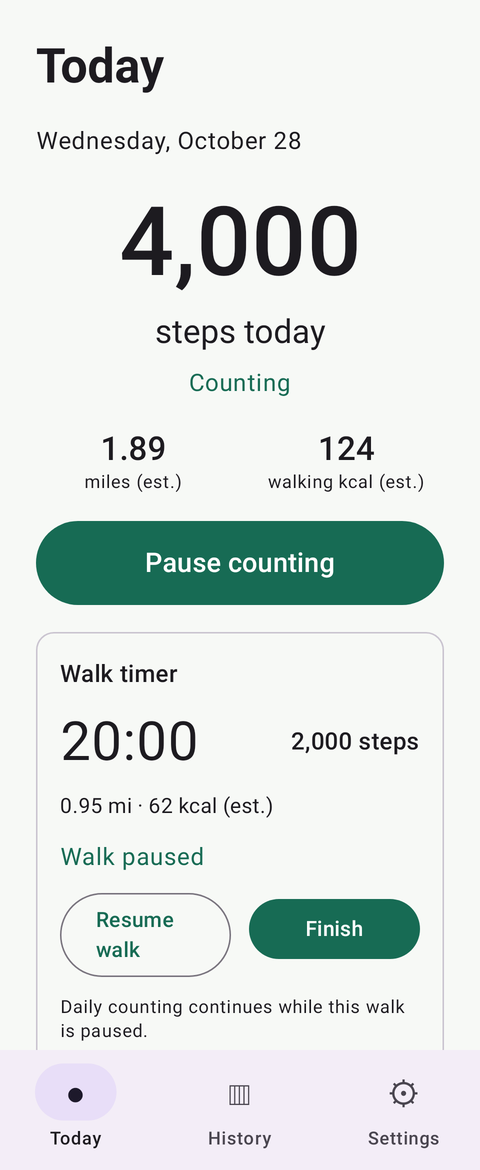
Development screenshot · sample step data.
Made for the everyday
Some apps should be simple. Pedometer is built around the phone’s step counter, a walk timer, and optional local history.
Start or pause counting. Time a walk. Look back at your days. Distance and walking calories are estimates, with settings for step length and optional weight.
The public privacy policy is being reviewed before Pedometer’s download opens.
Today’s total, with straightforward Start and Pause controls.
Pause, resume, finish, and optionally save a walking session.
Optional daily history and saved walks stay on your device.
Set your step length and optional weight. The numbers remain estimates.
From the project
Free Android download
You’ll be able to download Pedometer here as an APK, an Android installer. No ads, accounts, or subscriptions. Just you and your next walk.
The first public website download is being prepared. No installer is available here yet.
We’re working on bringing Pedometer to the Google Play Store. It isn’t listed there yet, and there’s no confirmed availability date. The official store link will appear here when it’s ready.
Before you install
A browser may warn about downloading an APK, and Android may ask whether to allow an app to be installed from that browser. Those prompts can appear when installing outside Google Play. The wording and available options depend on your phone and Android version.
If Android asks, allow installation from the browser or file manager you used to open this official APK. That permission applies to that source only. Turn it off again after installation. Keep Google Play Protect enabled throughout.
Read each prompt and keep Google Play Protect on. Let it scan the app if asked. If Play Protect reports a harmful app, or your phone blocks installation, stop. Contact me for help, or wait for the Google Play version. You don’t need to turn off security protections to use this website.
Android 10 or newer and a built-in step-counter sensor. The app needs permission to recognise physical activity to count steps. It may also ask for notification permission so it can show its counting status. It doesn’t request internet or location access.
Of course. We’re working toward a Google Play release and will add the official link here when the app is available. There’s no announced date yet.