A compact timeline
Today, Yesterday, and date headings. Exact times with optional seconds, plus a quick sense of how long ago.
A simple Android app
Swiped it away?
Keep the when.
A little record of which app notified you, and when. Clear the notification. Keep the timestamp.
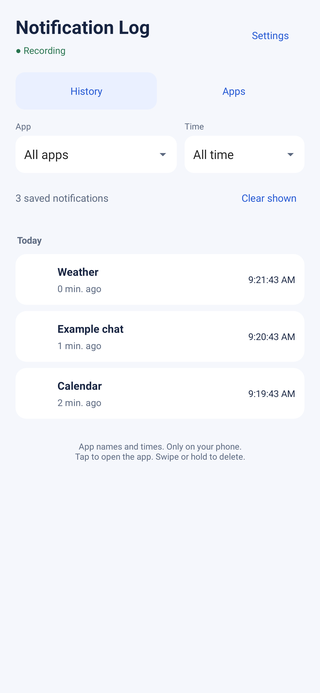
App screenshots · illustrative entries.
One useful little thing
Was that the weather app? Your calendar? Something you meant to check before your thumb got there first?
Notification Log keeps a running timeline of app names and notification times, including notifications you later dismiss. Browse everything together, pick one app, or look back through a particular day.
It starts recording after you grant notification access. It can’t recover alerts that were already dismissed before recording began, and it doesn’t save what a message said.
Today, Yesterday, and date headings. Exact times with optional seconds, plus a quick sense of how long ago.
Filter by app and time, or use the Apps view to see counts and the latest notification. Tap an entry to open its app.
Choose which apps get recorded. Swipe or hold an entry to delete it, with a short Undo window for an overenthusiastic thumb.
No ads, accounts, subscriptions, analytics, internet permission, or location permission. Light and dark appearance follow your phone.
A look inside
These are app screens with sample entries, not anyone’s message history.
Free Android download · 1.0.0
Download the APK, an Android installer. No account, payment, or subscription needed.
Compare the APK’s SHA-256 checksum to check that the file arrived intact.
95780393fec9245df32fcc7f3a15ac619f7ba9303c35f905c5e369b58b94a4cfBefore you install
Open the downloaded APK on your Android phone and follow the installation prompts. Android may ask you to allow installation from the particular browser or file app you used. This is a direct website download, not a Google Play listing.
Keep Play Protect enabled. If Android reports the app as harmful or blocks installation, stop and contact us rather than bypassing that warning.
Open Notification Log, choose Enable notification access, and enable it in Android’s settings. Android grants broad access to notifications; this app uses metadata and does not read or save message text. Downloaded apps may require an additional per-app confirmation before Android allows notification access.
When the app says Recording, new notifications can be saved while its screen is closed. To update an earlier installation, install over it; don’t uninstall or clear its data first.
Read Notification Log’s privacy details before enabling access.
No. The visible history is app names and notification posting times. Internal hashed identifiers, grouping flags, timestamps and counts help handle updates and duplicates. Message titles and text aren’t read or saved.
Not necessarily. Android apps can update or group their notifications. Notification Log combines matching group summaries and rapid updates where metadata allows it, but it is a notification timeline rather than an exact email or message counter.
No. It records notifications Android shares with it. It does not request location, usage-access, or accessibility permissions.
Yes. Settings → Apps to record controls future recording. Existing history stays until you clear it. Clear shown respects your app and time filters. Deletion has a 10-second Undo window.
It can’t reconstruct notifications dismissed before recording, or gaps while Android disconnects the listener or access is off. Notifications from another profile or Secure Folder may be unavailable. Phone-specific battery management can affect background behavior.